How to give Claude Code memory across sessions
Every new Claude Code session starts from the files on disk and whatever you wrote in CLAUDE.md. The plan, the decisions, and where you stopped are gone. Here is what actually persists, what does not, and a local fix that works with Cursor and Codex too.
You close the terminal on Friday with a plan half executed. On Monday, Claude Code opens fresh, reads your repository, and asks what you would like to work on. The plan, the three decisions you made on Thursday, the file you were in the middle of, the test that was failing: none of it is there.
This is not a bug. It is how the tool is built, and once you know exactly what persists and what does not, the fix is small.
What Claude Code actually remembers
Three things survive between sessions, and only three.
CLAUDE.md files. The project-level and user-level instruction files are read at the start of every session. They are the right place for standing rules: how to run tests, which directories to leave alone, how you like commit messages. They are the wrong place for state, because you maintain them by hand and they drift the moment you stop editing them.
The auto-memory file. Claude Code can save short notes it decides are worth keeping. It is useful and it is also opaque: you do not control what lands there, it is specific to Claude Code, and Cursor or Codex will never read it.
/resume and --continue. You can reopen a previous conversation. That restores the transcript, which is the whole history including every dead end, and it only works inside Claude Code on the same machine.
Everything else is rebuilt from scratch: what the current task is, which files matter right now, what you decided and why, what the last session left open, and what your git tree looked like when you stopped.
The three workarounds, and where each one stops
Re-explaining by hand. It works and it costs the first ten or fifteen minutes of every session. It also degrades, because you explain what you remember, and the part you forget is usually the constraint that caused the last bug.
Stuffing state into CLAUDE.md. People try this, and it turns the instructions file into a diary. The file grows, the instructions get buried, and the state is stale within a day because nothing updates it automatically.
/compact before you stop. Compaction summarises the current conversation so it fits in the context window. It does nothing for the next session, and the summary is lossy in ways you cannot inspect. Our post on `/compact` versus `/clear` covers when each is right.
All three share the same limit: they are inside one tool. The moment you open Cursor for a hard refactor, or Codex for a review, that tool starts from zero and Claude Code's memory does not travel.
What a session actually needs on day two
Strip it down and a session needs a small, structured set of facts, not a transcript:
- The plan or spec, as it currently reads.
- The files that matter for this work, ranked, not the whole repository.
- Git state: branch, what is modified and uncommitted, recent commits.
- A digest of what the last session decided and left open.
- Notes that inform the work, if you keep them in something like Obsidian.
That is working state. It changes every day, it lives in the project, and it can be read from the project instead of remembered by a model.
The fix: a context file the session loads
ctxfile is a local MCP server that snapshots exactly that set into one structured object and serves it to any MCP client. Claude Code calls get_context at the start of a session and starts already knowing the plan, the key files, the git state, and the last session's digest. Nothing leaves your machine; the default path makes zero network calls.
A snapshot takes about two seconds. This is a replay of a real run:
event: snapshot · POST /api/internal/snapshot
Install once and register it with Claude Code from your project directory:
claude mcp add ctxfile -- npx -y ctxfileThen run the initialiser. It detects the tools you use and installs a small behaviour skill so your agent checkpoints on its own at natural stopping points, announced every time:
ctxfile initFrom then on, a new session opens with the context already loaded. Ask it what you were working on and it answers from the snapshot, not from a summary you typed.
What this looks like in practice
Friday, 6pm. You have been in Claude Code for two hours on a webhook handler. You reach a stopping point and the agent checkpoints: plan, files touched, three decisions, two open items.
Monday, 9am. New session. "Continue." Claude Code loads the context object and replies with the open items, the branch you are on, and the file you stopped in. No re-explaining.
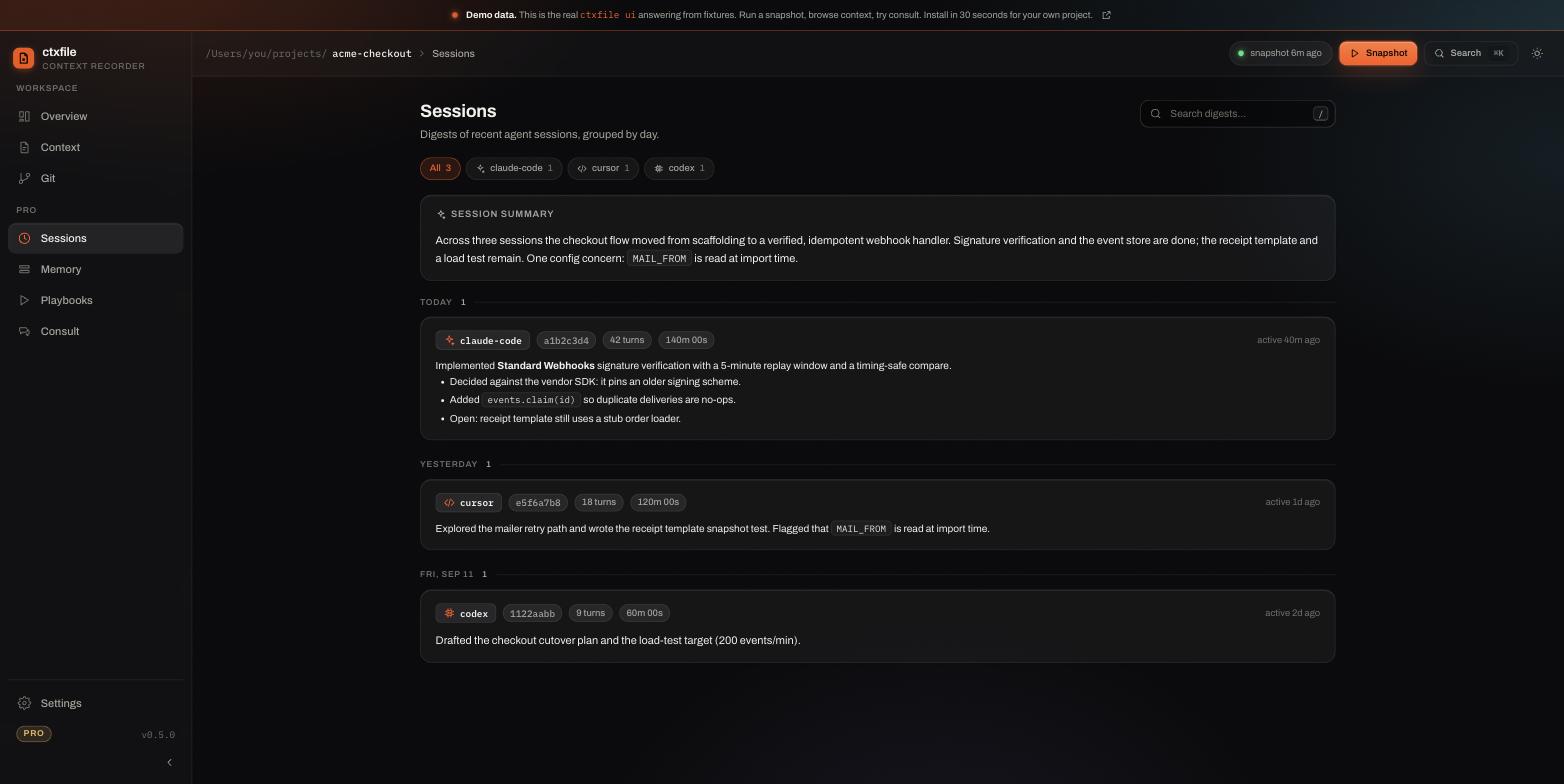
This is the session history the new session reads, as the dashboard shows it:
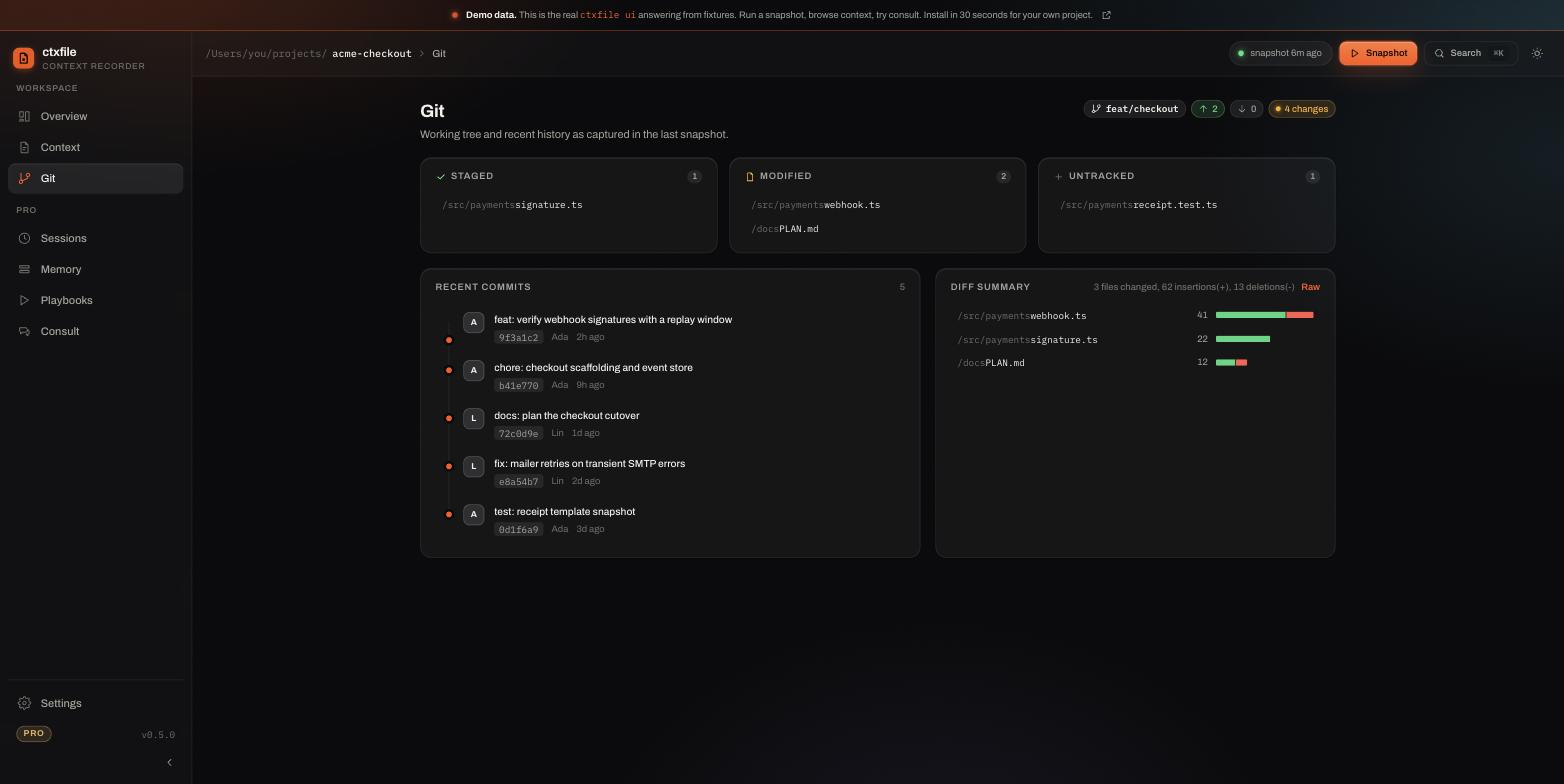
Git state travels the same way, so the new session knows what is staged, modified, and untracked without being told:
Tuesday. The refactor is gnarly and you would rather do it in Cursor. Cursor is an MCP client too, so it loads the same object and starts from the same facts. Wednesday, Codex reviews the diff with the same context. Three tools, one memory, and the memory is yours: it is a file in your repository, not a vendor's chat history.
What persists, side by side
- CLAUDE.md: instructions you write. Persists. One tool reads it. You maintain it.
- Auto-memory: notes Claude Code chooses. Persists. One tool. You do not control it.
/resume: the full transcript. Persists on one machine, one tool, including the noise.- ctxfile snapshot: plan, ranked files, git state, session digests, notes. Rebuilt on every call from the project itself. Any MCP client. Committed to your repo if you want it to travel with a clone.
Keep CLAUDE.md. It is the right home for rules. Give the state its own home.
An honest boundary
This reduces the reconstruction work at the start of every session. It does not give a model perfect recall, and it does not make Claude, Cursor's model, and Codex reach identical conclusions; they are different models. What changes is the starting point: all of them begin from the same facts about your project instead of from nothing. If you want to see the object a session receives before installing anything, the live demo shows the real dashboard over a sample project.