How to Share Context Between Claude Code and Cursor
You explain the project to Claude Code in the terminal, then open Cursor and explain it again. Neither tool can read the other's memory. Here is why, what the common workarounds get wrong, and how to give both of them one shared context layer.
You spend an hour with Claude Code in the terminal. It learns the architecture, the constraint you are working around, the three files that actually matter. Then you switch to Cursor for some inline editing, and it knows none of it. So you explain the project again.
This is not a bug in either tool. It is a structural gap, and it has a clean fix.
Why neither tool can see the other
Claude Code and Cursor store their understanding of your project in different places, in different formats, for different lifetimes.
Claude Code reads a CLAUDE.md file at the start of each session, plus whatever it discovers by reading files during the conversation. Cursor reads .cursor/rules/*.mdc files and maintains its own workspace index. Neither format is readable by the other tool, and neither one contains the part that actually hurts to lose: the live working state. The plan you settled on forty minutes ago. The decision to not use the caching layer. The fact that you are three commits into a refactor with uncommitted changes.
That state lives in one place — the conversation you are about to close.
The three workarounds, and how each one fails
Re-pasting by hand. It works, and it costs you the first ten or fifteen minutes of every context switch. It also degrades: you paste what you remember to paste, which is never the full picture, and the parts you forget are usually the parts that caused the last bug.
Symlinking config files. Point .cursor/rules/ and your CLAUDE.md at one shared file and you have solved a real but small part of the problem. Instructions are now shared. Working state still is not, because working state was never in those files. The instructions also drift, because the formats are not actually interchangeable.
Copying CLAUDE.md into Cursor's rules. Same ceiling, plus a maintenance burden. Every edit now has to happen twice, and the day you forget is the day the two tools start disagreeing about your own project.
All three share one root problem: they synchronise instructions you wrote by hand, when the expensive thing to lose is state read from the project itself.
The actual fix: both are MCP clients
Claude Code and Cursor are both Model Context Protocol clients. MCP is an open standard for connecting AI tools to external data sources, and its whole point is that any compliant client can talk to any compliant server.
So instead of syncing two config formats, point both tools at one server that reads your project directly and hands back the same structured object to whoever asks.
That is what ctxfile does. It runs locally, reads your repository, and exposes the result over MCP. Claude Code calls it. Cursor calls it. They get the same answer.
This is the object both tools receive. Switch the scope tabs to see how much travels for each kind of call:
1{2 "meta": {3 "name": "ctxfile",4 "generatedAt": "2026-07-10T17:41:02Z",5 "tokenBudget": 50000,6 "tokensUsed": 18432,7 "connectors": [8 { "name": "file", "status": "ok", "durationMs": 947 },9 { "name": "git", "status": "ok", "durationMs": 512 },10 { "name": "notion", "status": "skipped" }11 ]12 },13 "plan": "Ship checkout flow: webhook handler, then receipt emails.",14 "keyFiles": [15 { "path": "src/payments/webhook.ts", "tokens": 1284, "redactions": 2 },16 { "path": "src/payments/receipt.ts", "tokens": 911, "redactions": 0 }17 ],18 "gitState": { "branch": "feat/checkout", "ahead": 2, "modified": ["src/payments/webhook.ts"] },19 "sessionSummary": "Implemented signature verification; receipt template next."20}
Setting it up
Install once. One global install serves every client on the machine.
npm install -g ctxfileThen run the initialiser from your project directory. It detects the project and the harnesses you already use, offers to install the checkpoint skill, and writes nothing outside your machine.
ctxfile initRegister it with Claude Code. Run this from the project directory — that is what --root . points at.
claude mcp add ctxfile -- ctxfile --root .Register it with Cursor. Add this to .cursor/mcp.json in the project, or ~/.cursor/mcp.json to make it global.
{
  "mcpServers": {
    "ctxfile": {
      "command": "ctxfile",
      "args": ["--root", "."]
    }
  }
}
That is the whole setup. Both tools now have six tools available to them: get_context, save_session, continue_thread, list_threads, ingest_context and ingest_memory.
The test that proves it works
Open Claude Code and ask it what you are working on. It calls get_context and answers from your actual project state rather than from a summary you wrote.
Do some work. When you reach a natural stopping point, let it checkpoint.
Now open Cursor and type Continue.
If it picks up where the terminal left off — same plan, same decisions, same open items — the layer is working. That handoff between two different vendors' tools, with no copy-paste in between, is the entire point.
What actually travels
The context object is structured, not a blob of text:
- The current plan
- Ranked key files, chosen by relevance rather than dumped wholesale
- Git state, including the branch and what you have not committed
- Session digests from previous work
- Threads, which give a piece of work a durable identity across tools
- Notes from a connected Obsidian vault, if you have one
- Notion pages, if you have connected them
Everything carries provenance, so a downstream agent can tell what was read by a parser and what was reported by another agent.
The dashboard shows the same object the agents get, so you can check what will travel before either tool loads it:
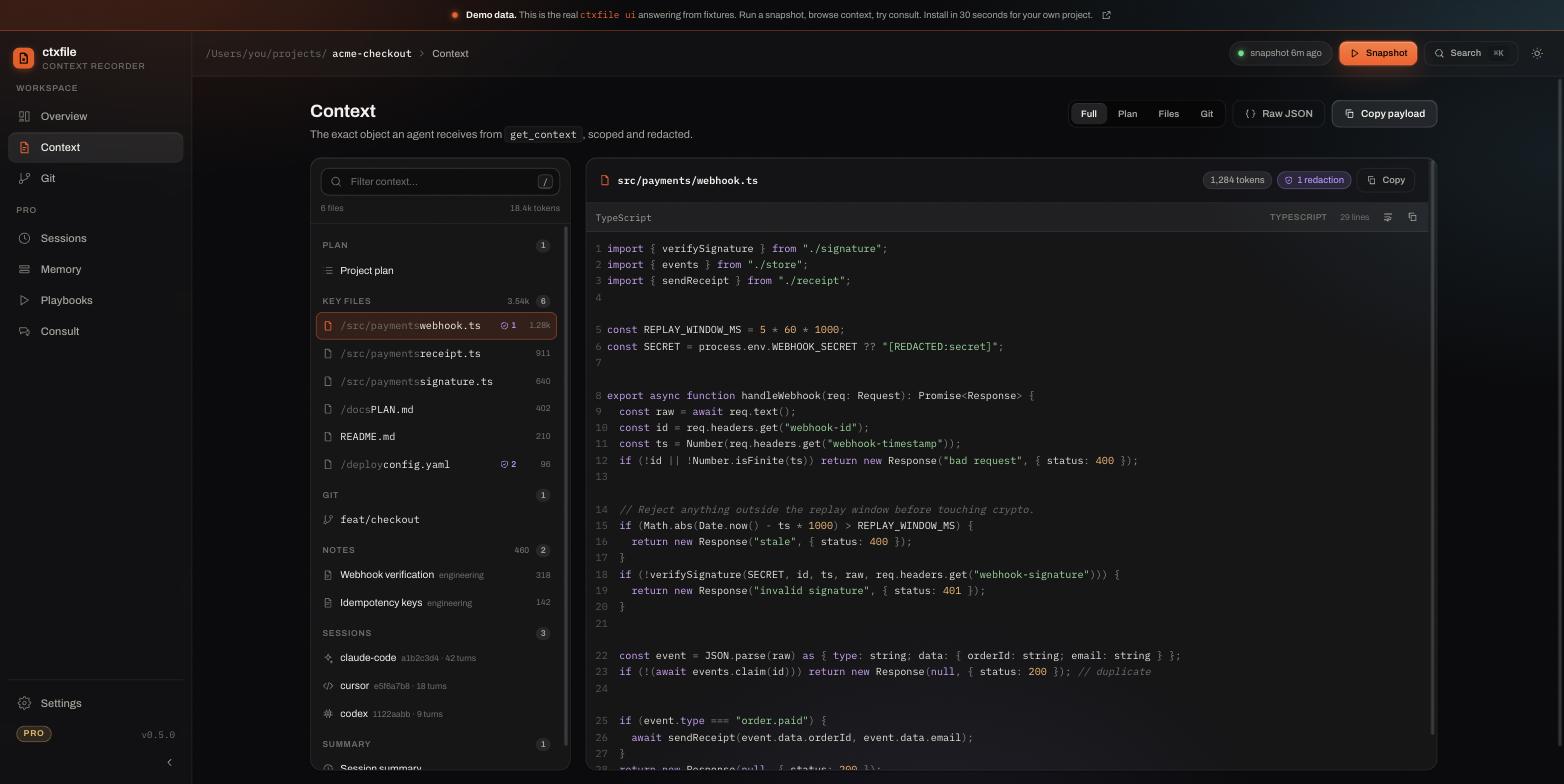
You can click through this view in the live demo without installing anything.
An honest boundary
This reduces reconstruction work. It does not give you perfect memory, and it does not make two different models behave identically. Claude and whatever powers your Cursor session will still reach different conclusions sometimes, because they are different models. What changes is that they start from the same facts instead of from nothing.
That is a smaller claim than "shared memory between your AI tools," and it is the one that survives contact with actual use.
Where your code goes
Nowhere. The default path makes zero network calls — no account, no server, no telemetry. Files matching denied patterns such as .env and credential files are excluded before anything is read, and secret-shaped strings are redacted before they can enter a snapshot.
The core is Apache-2.0 and the source is public, so this is a claim you can check rather than one you have to take on faith.
To be equally clear about what it does not do: this is not a defence against prompt injection. The benefit is less unnecessary context exposure, not a security boundary.
Get started
npm install -g ctxfile
ctxfile init
Then open a second agent and type Continue.
The client setup docs cover Codex CLI, Gemini CLI, OpenCode, Aider, Claude Desktop and anything else that speaks MCP.