Claude Code /compact vs /clear, and How to Stop Losing Context Between Sessions
Both commands manage the context window and they are not interchangeable. Here is what each one actually does, when to reach for which, and the gap neither of them closes.
Long Claude Code sessions degrade. Answers get vaguer, the model forgets a decision you made an hour ago, and it starts re-reading files it already read. The two commands people reach for are /compact and /clear. They do very different things, and using the wrong one costs you either money or your working state.
What is in the context window
Everything the model can currently see:
- The system prompt and your project instructions
- The full conversation so far
- Every file the agent has read
- Every tool call and its output
- Definitions for connected MCP servers and skills
That last one surprises people. Connect enough servers and a meaningful slice of the window is spent before you type anything.
/compact: summarise and keep going
/compact replaces the conversation so far with a summary and continues in the same session. The thread of work survives; the verbatim history does not.
Use it when you are deep in one task and want to keep going. Two things worth knowing:
Run it proactively. If you wait for automatic compaction to trigger at the limit, the summary is produced under pressure and tends to be worse. Compacting at a natural pause — a passing test suite, a finished function — gives a cleaner summary because the work is at a coherent boundary.
It is not free. Producing the summary means processing the context you are compacting, so it bills against the full window. Compacting every few minutes is a good way to spend tokens achieving nothing.
It is lossy. The summary keeps what the summariser judged important. Details it dropped are gone, and you will not get a warning about which ones those were.
/clear: wipe and start over
/clear empties the context window. No summary, no carry-over. The next message starts from a clean slate, with your project instructions reloaded.
Use it on a genuine task switch. If you have finished the auth refactor and you are moving to a CSS bug, the entire auth conversation is now noise that will cost you tokens and occasionally mislead the model. Clear it.
The mistake is using /clear when you meant /compact, mid-task. That does not reset the noise, it resets you — back to explaining the task from scratch.
Choosing between them
- Still on the same task, window filling up →
/compact - Finished a task, moving to an unrelated one →
/clear - Answers going vague and you are not sure why → check what is consuming the window before doing either
The gap neither command closes
Here is what both have in common: when the session ends, the working state is gone.
CLAUDE.md survives, and it is genuinely useful — it reloads at the start of every session and survives /clear. But look at what it is. It is a file you write and maintain by hand. It holds instructions and durable facts. It does not hold:
- What you decided in the last session, and why
- Which files you were actually working in
- What is uncommitted right now
- Which of the four possible approaches you already ruled out
- What the next step was going to be
So tomorrow morning, or the moment you switch to Cursor, you start explaining again. Not because the context window was mismanaged, but because that state was never written down anywhere durable.
Closing it
The missing layer is a snapshot of working state that outlives the session and is readable by any tool.
ctxfile is a local MCP server that builds one. It reads the project directly — plan, ranked key files, git state, session digests, threads — and serves it to any MCP client that asks.
A snapshot takes about two seconds. This is a replay of a real run, in the same event format the dashboard streams:
event: snapshot · POST /api/internal/snapshot
npm install -g ctxfile
ctxfile init
Register it with Claude Code:
claude mcp add ctxfile -- ctxfile --root .The workflow becomes:
- Work as normal. Use
/compactand/clearexactly as described above — this replaces neither. - At a natural stopping point, let the agent checkpoint the session.
- Tomorrow, in a new session, ask it to load the project context. It calls
get_contextand starts with the plan, the decisions and the git state already in hand. - Or open a different tool entirely and type Continue.
What a checkpointed session looks like the next morning, in the dashboard:
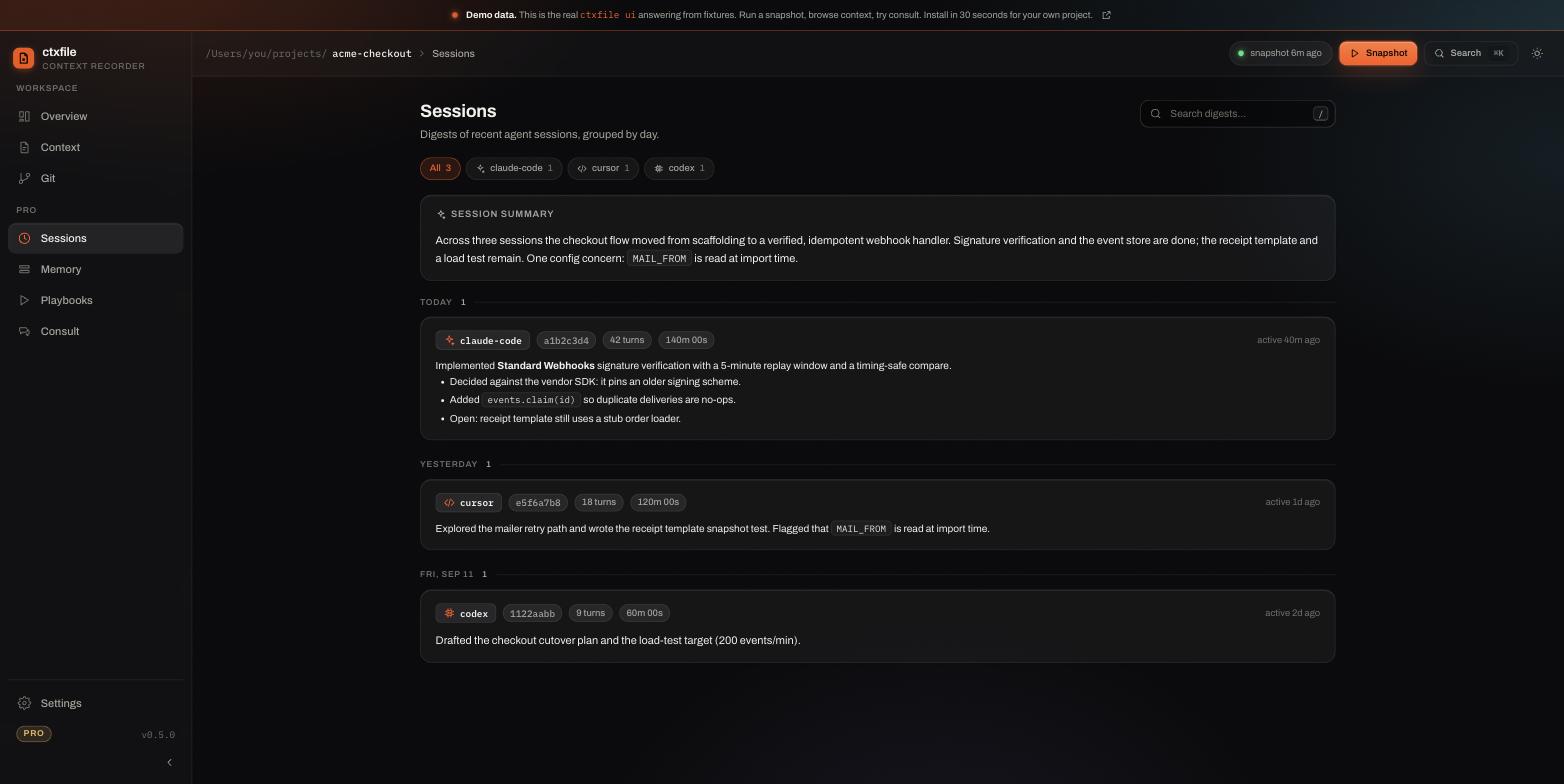
Because the snapshot is rebuilt on every call rather than hand-maintained, it does not drift the way a CLAUDE.md does. It reports the branch you are actually on, not the one you were on when you last remembered to edit the file.
Keep the parts that work
None of this replaces CLAUDE.md. Keep it. Project conventions, architectural rules and "always run the linter before committing" belong in a file you control, and they should be instructions, not state.
The split worth internalising: CLAUDE.md is for what you want to be true. A context snapshot is for what is currently true. The first you write; the second gets read from the repository.
One honest boundary: this reduces the work of rebuilding context. It does not give the model perfect recall, and two different models given the same context will still sometimes reach different conclusions.
Get started
npm install -g ctxfile
ctxfile init
Zero network calls by default, no account, Apache-2.0. See the threads and handoff docs for carrying one piece of work across several sessions and tools.