How to Switch from Cursor to Claude Code Without Losing Your Context
The hard part of the migration is not learning the new tool. It is that everything Cursor knows about your project stays in Cursor. Here is what does not transfer, and how to carry it across.
Plenty of guides cover installing Claude Code and learning its commands. That part takes an afternoon. The part that actually stings is that months of accumulated project understanding live inside Cursor, and none of it comes with you.
This post is about that second part.
What does not transfer
Your rules files. Cursor keeps project instructions in .cursor/rules/*.mdc (the older .cursorrules format is deprecated). Claude Code reads CLAUDE.md. Different formats, different conventions, no converter. Rewriting them by hand is tedious and — more importantly — lossy, because you will rewrite what you remember mattering.
Your workspace index. Cursor maintains its own index of your codebase. It does not travel and it has no equivalent to export.
Everything expensive. The decisions, the ruled-out approaches, the plan you converged on, the gotcha you hit last Tuesday. That lives in Cursor's chat history and in your head. There is no export button for it, and it is the only part that is genuinely hard to reconstruct.
A rules file you can rewrite in twenty minutes. Three weeks of "we tried that, it does not work because of the connection pooling" you cannot.
The manual path, honestly assessed
You can do this by hand:
- Open your
.cursor/rules/*.mdcfiles and rewrite them asCLAUDE.md. - Scroll back through recent Cursor conversations and write down the decisions worth keeping.
- Note where you had got to.
- Paste all of it into a fresh Claude Code session.
This works. It takes an afternoon, it captures maybe two-thirds of what mattered, and you have to repeat it every time you switch back. Which you will, because most people end up using both.
The portable path
The alternative is to stop treating context as something that belongs to a tool.
Both Cursor and Claude Code are MCP clients. Point them at one local server that reads the project directly, and the migration stops being a migration — it becomes two clients reading the same context.
Install it:
npm install -g ctxfile
ctxfile init
ctxfile init detects the project and the harnesses you already use. Run it before you switch, while Cursor is still your main tool.
While still in Cursor, register the server so it can start checkpointing your work. Add to .cursor/mcp.json:
{
  "mcpServers": {
    "ctxfile": {
      "command": "ctxfile",
      "args": ["--root", "."]
    }
  }
}
Work as normal for a day. Let sessions get checkpointed at natural stopping points, so decisions and open items land in threads rather than only in Cursor's history.
Then register Claude Code:
claude mcp add ctxfile -- ctxfile --root .Open it and type Continue.
It calls get_context, and starts with the plan, the ranked key files, the git state and the decisions from your Cursor sessions already loaded. You did not rewrite anything.
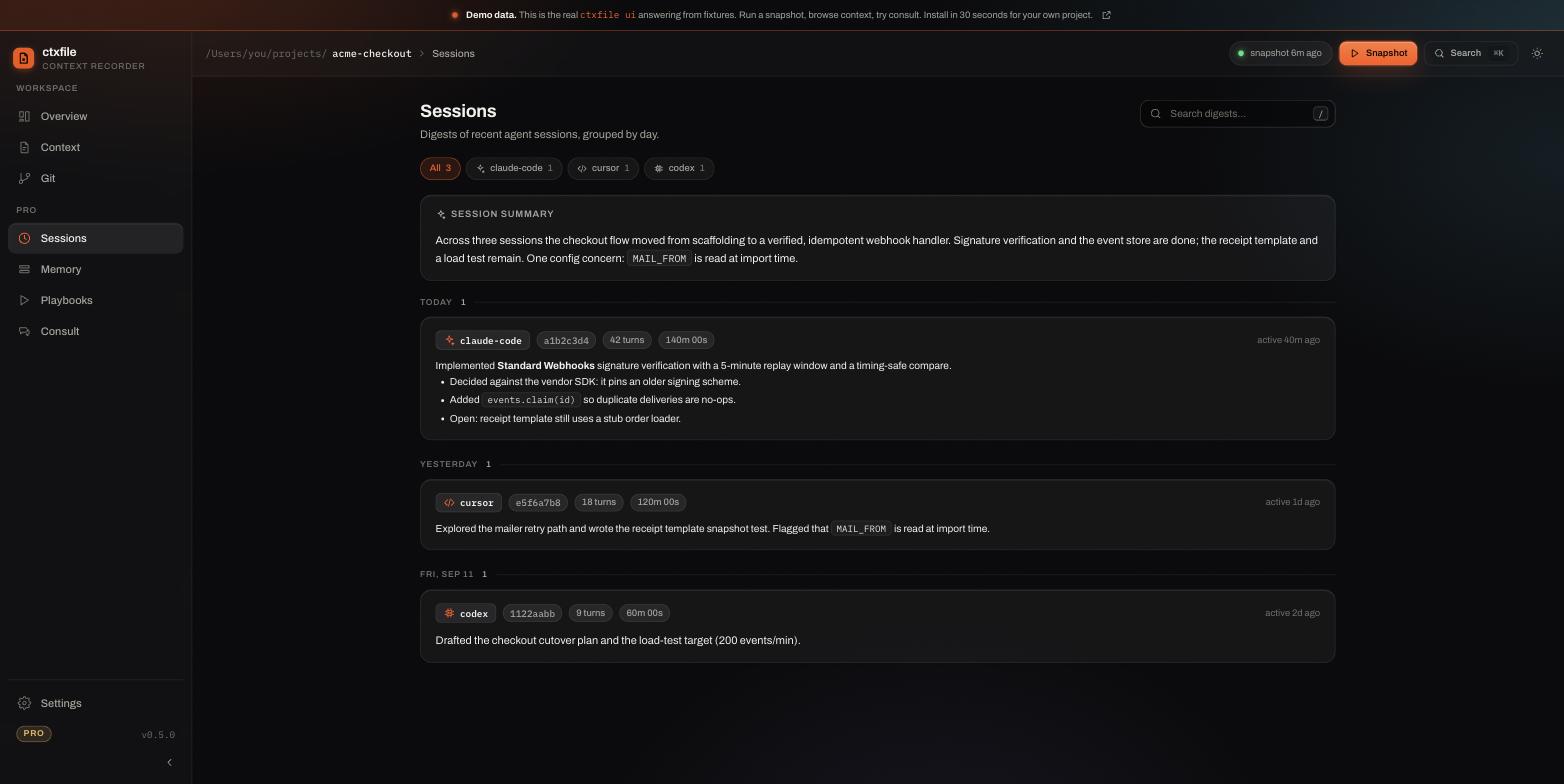
Sessions from Cursor, Claude Code, and Codex sit side by side in the dashboard, grouped by day. The tool you open next reads all of them:
You probably want both anyway
The framing of "switching" is usually wrong. The two tools are good at different things: Cursor for inline edits and tight review loops, Claude Code for longer autonomous runs in the terminal. Most people who try to pick one end up using both.
That is only painful when context belongs to a tool. Once it belongs to the project, moving between them costs nothing, and you can keep whichever workflow suits the task in front of you.
It also means the decision is reversible. If Claude Code does not suit you, going back is a no-op, because nothing you built up got locked into it.
What carries across
- The current plan
- Ranked key files, selected by relevance rather than dumped
- Git state, including uncommitted work
- Session digests from previous work in either tool
- Threads, which give a piece of work a durable identity across providers
- Notion pages and Obsidian notes, if connected
Each entry is tagged with its source, so an agent can tell what a parser read from what another agent reported.
Here is the shape of the object, scope by scope. The full scope is what a fresh Claude Code session asks for:
1{2 "meta": {3 "name": "ctxfile",4 "generatedAt": "2026-07-10T17:41:02Z",5 "tokenBudget": 50000,6 "tokensUsed": 18432,7 "connectors": [8 { "name": "file", "status": "ok", "durationMs": 947 },9 { "name": "git", "status": "ok", "durationMs": 512 },10 { "name": "notion", "status": "skipped" }11 ]12 },13 "plan": "Ship checkout flow: webhook handler, then receipt emails.",14 "keyFiles": [15 { "path": "src/payments/webhook.ts", "tokens": 1284, "redactions": 2 },16 { "path": "src/payments/receipt.ts", "tokens": 911, "redactions": 0 }17 ],18 "gitState": { "branch": "feat/checkout", "ahead": 2, "modified": ["src/payments/webhook.ts"] },19 "sessionSummary": "Implemented signature verification; receipt template next."20}
The boundary worth stating
Carrying context across is not the same as making two models behave the same way. Different models reach different conclusions from identical inputs, and no amount of shared context changes that. What you avoid is the cold start — the twenty minutes of re-explanation before the new tool is useful.
Where the data lives
On your machine. The default path makes zero network calls: no account, no upload, no telemetry. Denied paths such as .env files are excluded before ingestion, and secret-shaped text is redacted before it can enter a snapshot. The core is Apache-2.0, so you can read exactly what it does.
Get started
npm install -g ctxfile
ctxfile init
Register both tools, then type Continue in whichever one you opened second. Setup for every supported client — Codex CLI, Gemini CLI, OpenCode, Aider, Claude Desktop — is in the docs.