Connect Your Obsidian Vault to Claude Code, Cursor, and Any AI Agent
Your vault holds the reasoning behind your project. Your coding agent cannot see any of it. Here is how to give agents read-only access to the notes that matter right now, without uploading your vault anywhere.
You keep a vault. The architecture decision from March is in there, with the reasoning. So is the meeting note explaining why the API is shaped the way it is, and the running list of things that broke.
Your coding agent cannot see any of it. So you re-explain, from memory, badly.
The obvious approach does not work
The instinct is to give the agent the whole vault. Point it at the folder, let it read everything.
This fails for a boring reason: a vault of any size does not fit in a context window, and even when it does, filling the window with a thousand notes is close to useless. Ninety-nine percent of them are irrelevant to what you are doing right now, and they crowd out the code the agent actually needs to read.
Dumping everything and giving nothing produce surprisingly similar results.
The real problem is selection. Which handful of notes matter for the task in front of you, right now?
How ctxfile picks notes
ctxfile ships a read-only Obsidian vault connector in the free core, as of v0.4.0. It reads any local folder of Markdown — you do not need Obsidian itself, just the files — and ranks notes into tiers:
- Pinned notes first. Add
ctxfile: pinto a note's frontmatter and it is always included. This is your override for the three notes that are always relevant. - Notes relevant to what you are working on. Relevance is scored against the tags and title tokens of your recent threads, so the selection shifts as your work does.
- One-hop wikilink neighbours. If a selected note links to another with
[[wikilinks]], that neighbour gets a boost and a short preview. Your vault's own link structure is a signal about what belongs together. - Everything else, with relevance and then recency breaking ties.
Selection runs against a token budget, so the notes section stays proportionate instead of swallowing the snapshot.
It is also PARA-aware: if your vault uses that structure, Archive and Resources are off by default, because archived material is rarely what you need mid-task.
Setup
npm install -g ctxfile
ctxfile init
ctxfile init looks for a nearby .obsidian/ directory and offers to connect the vault it finds. Confirm, and the notes section starts appearing in your snapshots.
If your notes live somewhere non-standard, or you keep several vaults, configure them explicitly — see the connectors documentation.
Then register whichever agent you use. Claude Code:
claude mcp add ctxfile -- ctxfile --root .Cursor, in .cursor/mcp.json:
{
  "mcpServers": {
    "ctxfile": {
      "command": "ctxfile",
      "args": ["--root", "."]
    }
  }
}
The same works for Codex CLI, Gemini CLI, OpenCode, Claude Desktop, and anything else speaking MCP.
What the agent receives
Selected notes arrive as a notes[] section inside the context object, each stamped with provenance source: obsidian. The agent can tell a vault note from a source file from a git fact, which matters — a note is something you believed when you wrote it, not something read from the code today.
In practice: ask your agent why the sync layer is designed the way it is, and instead of guessing from the implementation, it answers from the note where you worked it out.
This is what a selected note looks like in the dashboard, rendered from the same object the agent receives:
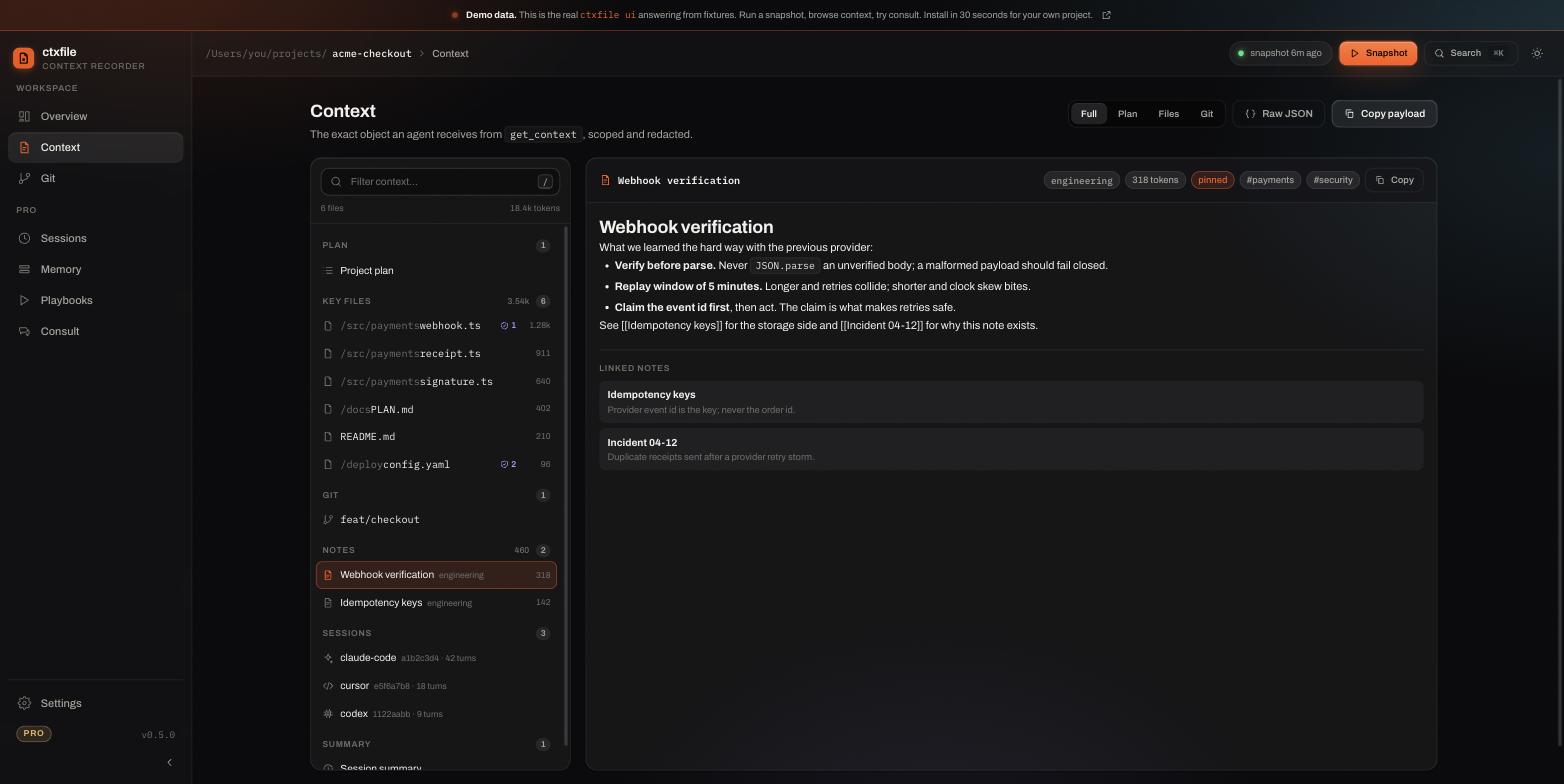
Try it in the live demo: the notes group sits between git state and sessions.
The privacy rules, precisely
This is a read-only connector and the constraints are deliberately strict:
- The vault is never synced or uploaded. It is read from disk when a snapshot is built. That is all.
- It is excluded from repo-safe exports. When you export a context file to commit alongside your repository, vault notes are left out. Your private thinking does not end up in a pull request.
- It passes through redaction. Notes go through the same secret-scrubbing as everything else, so an API key pasted into a note does not travel into a snapshot.
- Denied paths still apply. Credential files are excluded before anything is read.
And the default path still makes zero network calls. Connecting a vault does not turn anything on.
What this is not
ctxfile does not build a knowledge graph, run synthesis over your notes, or try to be a second brain. Obsidian is already good at that and replacing it is not interesting.
The division is deliberate. Your vault stays in Obsidian. ctxfile makes the relevant part of it portable, so your Claude Code session, your Codex session and your Cursor window can all load the same notes without you re-explaining. Nothing is written back; nothing is reorganised; your notes stay yours in the format you chose.
It also does not defend against prompt injection. A note containing hostile instructions is still a note containing hostile instructions. The benefit here is relevance and reduced exposure, not a security boundary.
Get started
npm install -g ctxfile
ctxfile init
Free, Apache-2.0, local. Then ask your agent something only your notes know, and see whether it answers.