How to Build a Local-First MCP Server in TypeScript
Most MCP tutorials build a server that calls a remote API. This one builds a server that never leaves the machine, and covers the design rules that keep it that way.
The Model Context Protocol is an open standard for connecting AI clients to data and tools. Most tutorials demonstrate it by wrapping a remote API — fetch the weather, query a SaaS product.
Local-first servers are a different and, for a lot of use cases, better shape. The data is already on the machine. There is no reason to send it anywhere, and several reasons not to. This post builds one and covers the design rules that keep it honest.
The model in one paragraph
An MCP server exposes capabilities. A client — Claude Code, Cursor, Claude Desktop, Codex CLI, Gemini CLI — connects and uses them. Servers expose tools (things the model can call), resources (things it can read) and prompts (reusable templates). Because the protocol is a standard, one server works with every compliant client, today's and next year's.
A minimal server
Start a project:
mkdir my-mcp-server && cd my-mcp-server
npm init -y
npm install @modelcontextprotocol/sdk zod
npm install -D typescript @types/node
Set "type": "module" in package.json — the SDK is ESM.
Now the server:
import { McpServer } from "@modelcontextprotocol/sdk/server/mcp.js";
import { StdioServerTransport } from "@modelcontextprotocol/sdk/server/stdio.js";
import { z } from "zod";
import { readFile } from "node:fs/promises";
import path from "node:path";

const server = new McpServer({ name: "my-server", version: "0.1.0" });
const ROOT = process.cwd();

server.registerTool(
  "read_project_file",
  {
    description: "Read a UTF-8 file from the project directory.",
    inputSchema: {
      relativePath: z.string().min(1).describe("Path relative to the project root"),
    },
  },
  async ({ relativePath }) => {
    // Resolve and confirm containment before touching the filesystem, so
    // "../../.ssh/id_rsa" cannot escape the root.
    const target = path.resolve(ROOT, relativePath);
    if (target !== ROOT && !target.startsWith(ROOT + path.sep)) {
      return { content: [{ type: "text", text: "Path is outside the project root." }] };
    }

    const body = await readFile(target, "utf8");
    return { content: [{ type: "text", text: body }] };
  }
);

await server.connect(new StdioServerTransport());
console.error("my-server running on stdio");
Compile it, then register it with a client:
claude mcp add my-server -- node /absolute/path/to/dist/index.jsThe one mistake that will cost you an afternoon
Look at that last line again:
console.error("my-server running on stdio");Never console.log in a stdio MCP server. stdout is the JSON-RPC transport. Anything you print there is injected into the protocol stream and corrupts it, and the failure mode is a client that mysteriously will not connect with no useful error.
Every diagnostic goes to stderr. This is the single most common way a first MCP server fails.
Making it local-first
A server that reads local files but phones home is not local-first. Four rules make the difference.
1. Zero network calls on the default path
Not "we do not send anything sensitive" — no outbound requests at all unless the user has explicitly configured a feature that needs one. That makes the promise verifiable: someone can run your server behind a firewall, or watch it with a proxy, and confirm silence.
Anything that does need the network — a remote model, a sync service, telemetry — is opt-in, off by default, and loudly flagged.
2. Deny sensitive paths before reading
Do not read the file and then decide. Exclude by pattern first:
const DENIED = [/(^|\/)\.env(\..*)?$/, /(^|\/)\.git\//, /id_rsa|\.pem$|credentials?\.json$/];

function isDenied(relativePath: string): boolean {
  return DENIED.some((pattern) => pattern.test(relativePath));
}
The ordering matters. A file you never opened cannot leak through an error message, a log line or a partially-built response.
3. Redact before returning
Deny-lists catch files with predictable names. They do not catch an API key pasted into a README. Run outbound content through a redaction pass:
const SECRET_PATTERNS: RegExp[] = [
  /\bsk-[A-Za-z0-9]{20,}\b/g,              // common API key shape
  /\bghp_[A-Za-z0-9]{36}\b/g,              // GitHub token
  /-----BEGIN [A-Z ]*PRIVATE KEY-----/g,
];

function redact(text: string): string {
  return SECRET_PATTERNS.reduce((acc, p) => acc.replace(p, "[redacted]"), text);
}
This is defence in depth, not a guarantee. Say so in your README rather than implying it is airtight.
4. Keep tool schemas tight
Every tool schema is documentation the model reads. Loose schemas produce malformed calls and wasted turns:
inputSchema: {
  scope: z.enum(["plan", "files", "git", "all"]).describe("Which slice to return"),
  maxTokens: z.number().int().min(100).max(50_000).default(8_000),
}
An enum eliminates a whole class of invalid input. Bounds stop a model from asking for a response that will not fit anywhere.
When to move past stdio
stdio is right for a local server: the client spawns your process, no ports, no auth, nothing listening. Keep it unless you specifically need otherwise.
You need HTTP when the client is not on the machine — a browser-based chat product, a CI job, a hosted agent. That changes the security model completely. Now you need authentication, you are exposing a listening socket, and "local-first" only holds if the thing on the other end is still yours. If you go there, bind to loopback by default and require an explicit opt-in for anything wider.
A worked example
ctxfile is an Apache-2.0 local-first MCP server built on these rules, and the source is public if you want to see them applied at more than tutorial scale. It snapshots a project's working state — plan, ranked key files, git state, session digests — and serves it to any MCP client through six tools: get_context, save_session, continue_thread, list_threads, ingest_context and ingest_memory.
Things worth reading in it: the redaction pass and deny-path handling, the token-budgeted file selection (choosing which files matter is most of the difficulty), and the export path, which produces a repo-safe context file containing a manifest of key files rather than their contents.
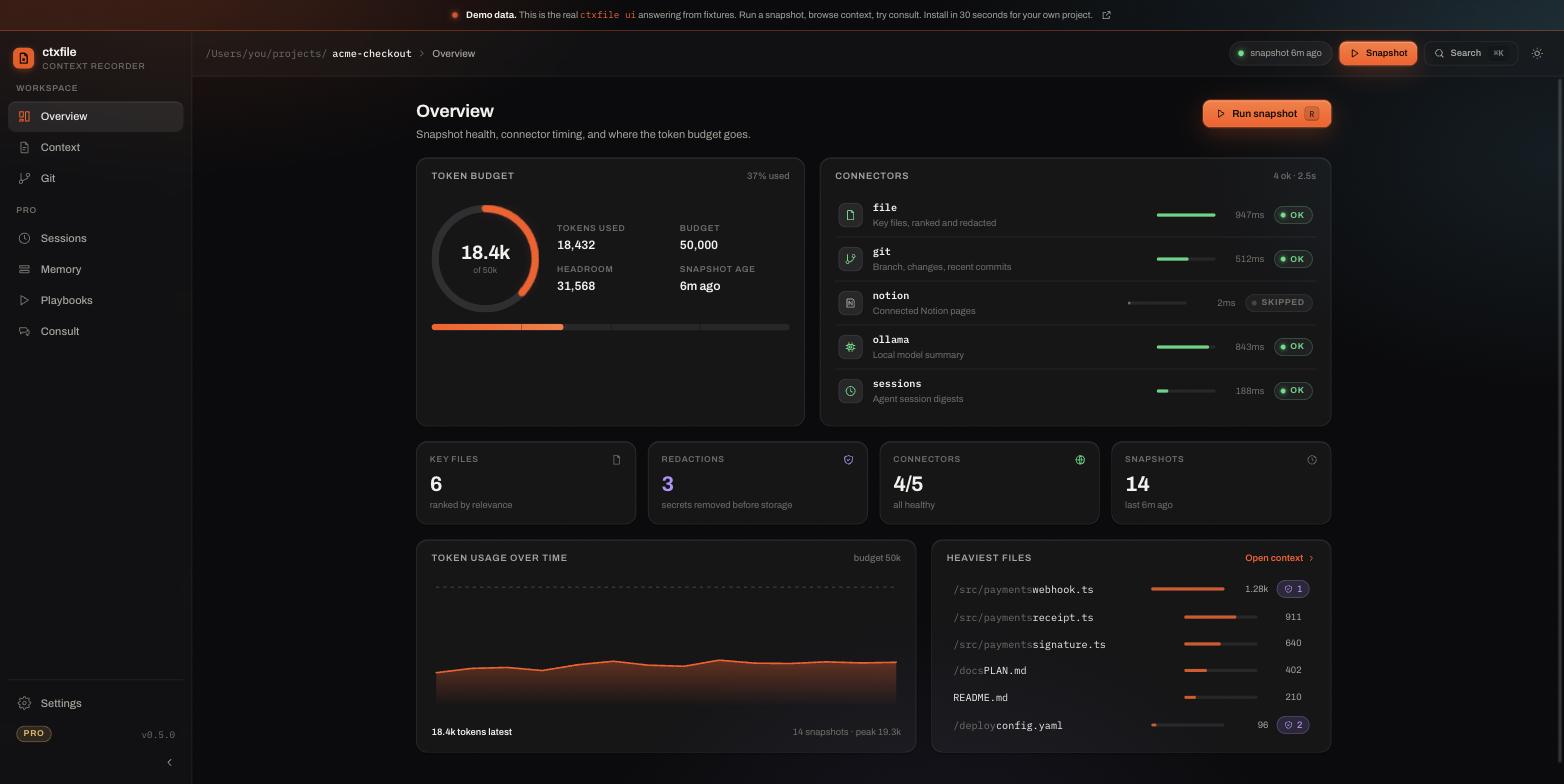
What the rules above look like once they are running. Every number here comes from a local run; the redaction count is the deny-path and secret-scrubbing pass doing its job:
Shipping it
Publish to npm so people can install it without cloning, then list it on the MCP Registry so clients can discover it.
Two things to get right in the README: the exact registration command for each client you support, and a plain statement of what your server does and does not send anywhere. For a local-first tool, that second one is the feature.
Try one that already works
A snapshot run, replayed in the wire format the real server streams to its dashboard (connector:start, connector:done, tokens, done):
event: snapshot · POST /api/internal/snapshot
npm install -g ctxfile
ctxfile init
Zero network calls by default, Apache-2.0, and the source is there to read. The live demo runs the dashboard over a sample project if you want to see the output before you build your own.